 Kindy
KindyHow to link your pairing code to the KindyWords mentor and send your child's first writing.
Connect Telegram
KindyWords lives inside Telegram, on your account and device — so your child gets a friendly writing mentor and you can always see the whole conversation. Connecting takes about two minutes.
Before you start
You’ll need a pairing code — you get one when you register. It looks like
KW-A1B2C3 and links your Telegram chat to your child’s practice.
Step 1 — Get Telegram (2 minutes, free)
Telegram is a free messaging app. Install it on the device your child will use with you:
- iPhone or iPad: open the App Store, search “Telegram”, tap Get (the maker is “Telegram FZ-LLC”).
- Android phone or tablet: open Google Play, search “Telegram”, tap Install.
- Computer (optional): download from telegram.org — handy for reading, though the phone camera makes photos easier.
Then create your account — it takes a minute:
- Open Telegram and tap Start Messaging.
- Enter your own mobile number (this is your account, never your child’s).
- Type in the code Telegram texts you, add your name, and you’re in.
Already have Telegram? Skip straight to Step 2.
Step 2 — Find the KindyWords mentor
In Telegram’s search bar, type @KindyWordsBot and open it, or simply visit t.me/KindyWordsBot. Press Start.
Step 3 — Send your pairing code
Type your pairing code (for example KW-A1B2C3) as a message and send it. The mentor replies:
You’re all set! Send me a photo of your writing. ✏️
If the code doesn’t work, check for typos or register again for a fresh code.
More than one young writer at home? Register each child and send each pairing code in the same chat. When a photo arrives, the mentor simply asks “Whose writing is this?” — reply with a number or the child’s name.
Step 4 — Write, snap, send
Your child writes on paper — words, sentences, stories, drawings, invented spellings all welcome. Then photograph the page and send the photo in the chat.
Photo tips: lay the page flat, use good light, fill the frame with the writing, and hold the camera straight above. The easier it is to read, the better the feedback.
What the replies mean
Each reply arrives as up to three parts:
- A voice message 🎙️ — your child taps the bubble and hears the mentor’s warm, encouraging reply. No reading needed. (It is always clearly an AI voice, never pretending to be a person.)
- Their own page back, decorated 🖍️ — cheerful circles drawn around the one or two words to practise, plus a smiley, a star, and a thumbs-up. Every page earns its stamps.
- A short text — the same feedback in writing, for you.
And what the mentor says:
- Praise plus one or two small things to try — never a wall of corrections. Feedback builds on what your child already wrote.
- “I think you wrote because — is that right?” — when the mentor isn’t fully sure, it asks instead of guessing. Reply yes or no (your child can tap it out with you).
- “Can you write it a bit bigger for me?” — when a page is too hard to read, the mentor just encourages another go. It never guess-corrects: a confident correction is only ever given on a confident read.
What a reply looks like

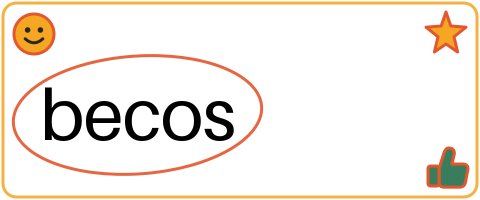
What wonderful writing! ⭐ One to try: because for “becos” — you're so close!
Example conversation — synthetic writing, real KindyWords reply.
Works wherever Telegram runs: iPhone, iPad, Android phones and tablets.
Connected? Here’s what to do next: our first week guide — how to introduce the mentor to your child, and the write-a-little-draw-a-little habit that makes it stick.
House rules (the important bit)
- You are the account holder. The mentor lives in your Telegram, on your device, and the whole thread is always visible to you.
- Practise together. KindyWords is built for supervised practice — a shared moment, not a babysitter.
- Privacy first. KindyWords completed an independent child-privacy and legal review before accepting any real family’s data — see Safety and Privacy.
Watch the progress
Every registered parent can check their child’s practice — streaks, practised and mastered words, and photos sent — in the parent portal. Log in with the email you registered; your one-time login code is emailed to you.